Read6
Understanding the problem domain is the hardest part of programming.
Javascript:
Object Literals:
- Objects group together a set of variables and functions to create a model of a something you would recognize from the real world. In an object, variables and functions take on new names.
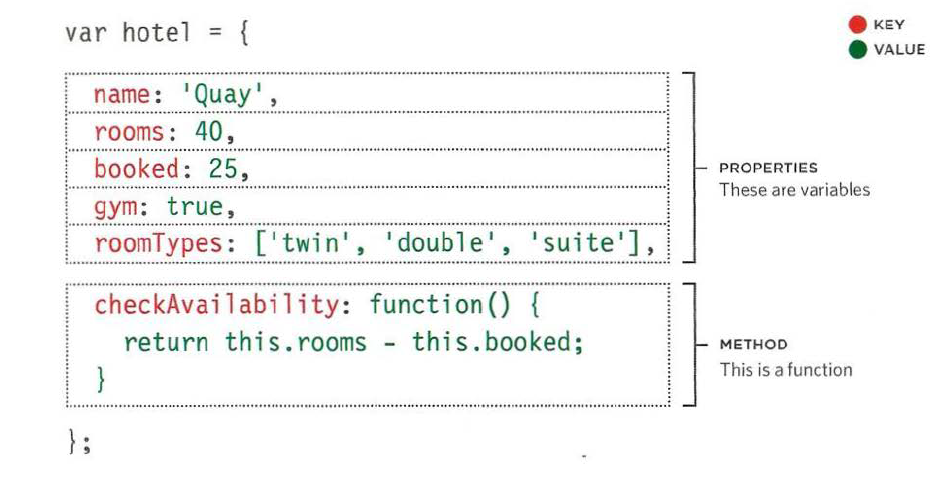
- Like variables and named functions,properties and methods have a name and a value. In an object,that name is called a key.see example.
-
If this site had 1,000 hotels,the only thing that would need to change would be the three properties of this object. Because we created a model for the hotel using data, the same code can access and display the details for any hotel that follows the same data model.
-
Programmers use a lot of name/value pairs:
- HTML uses attribute names and values.
- CSS uses property names and values.
- In JavaScript: • Variables have a name and you can assign them a value of a string, number, or Boolean. • Arrays have a name and a group of values. (Each item in an array is a name/value pair because it has an index number and a value.) • Named functions have a name and value that is a set of statements to run if the function is called. • Objects consist of a set of name/value pairs (but the names are referred to as keys).
Document Object Model:
- The Document Object Model (DOM) specifies how browsers should create a model of an HTML page and how JavaScript can access and update the contents of a web page while it is in the rowser window.
-
As a browser loads a web page, it creates a model of that page. The model is called a DOM tree, and it is stored in the browsers’ memory. It consists of four main types of nodes.
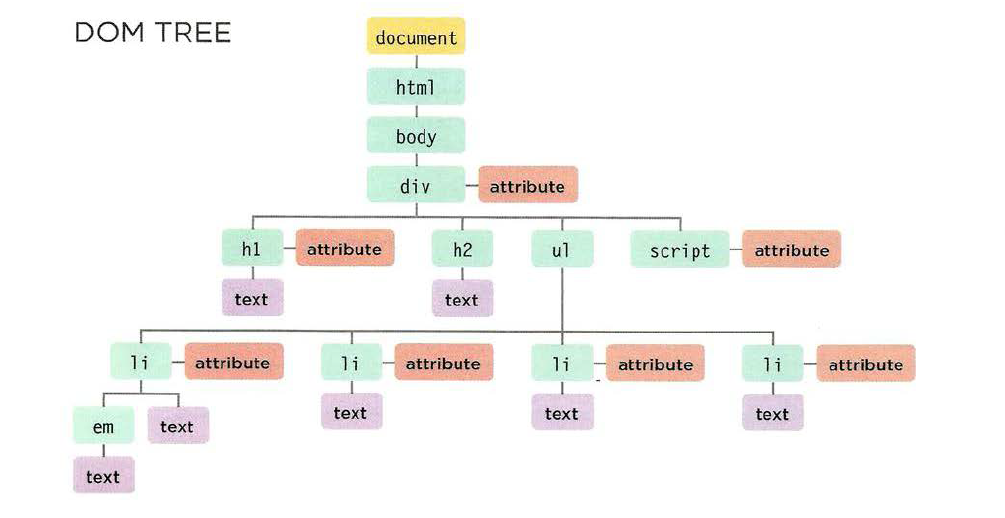
- Accessing and updating the DOM tree involves two steps: 1: Locate the node that represents the element you want to work with. 2: Use its text content, child elements, and attributes. STEP 1: ACCESS THE ELEMENTS. STEP 2: WORK WITH THOSE ELEMENTS.
- Methoda that find elements in the DOM tree are called DOM queries.when you need to waork with an element morw than once,you should use a variable to store the result of this query.
- DOM queries may return one element, or they may return a Nodelist,which is a collection of nodes.
- getElementByld( 1 id 1 )Selects an individual element given the value of its i d attribute . The HTML must have an id attribute in order for it to be selectable.
- querySel ector( 1css selector ‘) Uses CSS selector syntax that would select one or more elements .This method returns only the first of the matching elements.
- When a DOM method can return more than one element, it returns a Nodelist (even if it only finds one matching element).
- Array syntax is prefered over the item() method because it is faster.before selecting a node from a nodelist, check that it containes nodes.hif you repeatedly use the nodelist,store it in variable.
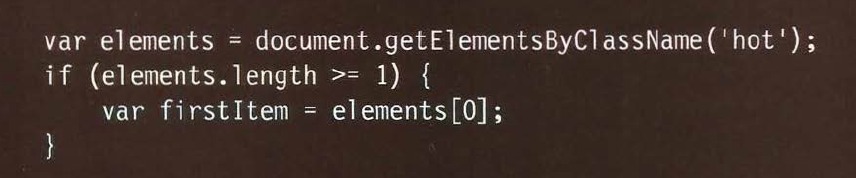
- SELECTING ELEMENTS USING CSS SELECTORS querySelector() returns the first element node that matches the CSS-style selector. querySelectorA11 () returns a Nodelist of all of the matches.
- When you have an element node, you can select another element in relation to it using these five properties. This is known as traversing the DOM.
- Traversing the DOM can be difficult because some browsers add a text node whenever they come across whitespace between elements.
- The code below shows how you access the second text node. It will return the result: document.getElementByid( 1 one 1 ).firstChild.nextSibling. nodeValue;
- innerText < li id=”one”>< em>fresh</ em> figs</ l i> l i - attribute document .getElementByid(‘one’) .textContent; One issue with the textContent property is that Internet Explorer did not support it until IE9. (All other major browsers support it.) You may also come across a property called inner Text, but you should generally avoid it for three key reasons: (SUPPORT,OBEYS CSS,PERFORMANCE).
- Dom manipulation can be safer than using innerHTML.but it requires more code and can be closer.
- Using the innerHTML property, you can access and amend the contents of an element,including any child elements.
-
element.innerHTML DOM MANIPULATION ADVANTAGES:• You can use it to add a lot of new markup using less code than DOM manipulation methods.• It can be faster than DOM manipulation when adding a lot of new elements to a web page. • It is a simple way to remove all of the content from one element (by assigning it a blank string). ADVANTAGES: • It is suited to changing one element from a DOM fragment where there are many siblings.• It does not affect event handlers.• It easily allows a script to add elements incrementally (when you do not want to alter a lot of code at once). DISADVANTAGES:• It should not be used to add content that has come from a user (such as a username or blog comment), as it can pose a significant security risk which is discussed over the next four pages.• It can be difficult to isolate single elements that you want to update within a larger DOM fragment.• Event handlers may no longer work as intended. DISADVANTAGES:• If you have to make a lot of changes to the content of a page, it is slower than i nnerHTML.• You need to write more code to achieve the same thing compared with innerHTML. - If you add HTML to a page using i nnerHTML (or several jQuery methods),you need to be aware of Cross-Site Scripting Attacks or XSS; otherwise,an attacker could gain access to your users’ accounts.
- Any content generated by users that contain characters that are used in code should be escaped on the server. You must control any markup added to the page.
- Any content generated by users that contain characters that are used in code should be escaped on the server. You must control any markup added to the page.
- ESCAPING USER CONTENT:All data from untrusted sources should be escaped on the server before it is shown on the page.Most server-side languages offer helper functions that will strip-out or escape malicious code.
- ADDING USER CONTENT:When you add untrusted content to an HTML page,once it has been escaped on the server, it should still be added to the page as text.
-
once you have an element node, you can use other properties and methods on that element node to access and change its attributes.
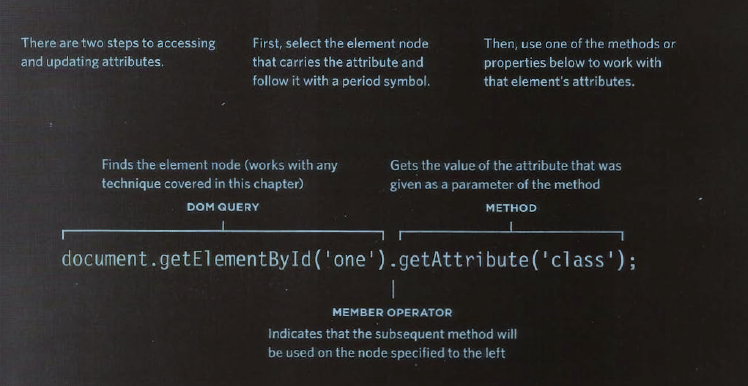
- To remove an attribute from an element, first select the element, then call removeAtt r i bute () . It has one parameter: the name of the attribute to remove.
- Browsers offer tools for viewing the DOM tree .