Read1
HTML:
All websites use HTML and CSS, but content management systems, blogging software, and e-commerce platforms often add a few more technologies into the mix.
-
HTMl main content: < html > < head > < title >This is the Title of the Page< /title > < /head > < body > < h1 >This is the Body of the Page< /h1 > < p>Anything within the body of a web page is displayed in the main browser window.< /p> < /body> < /html>
-
DOCTYPES tell browsers which version of HTML you are using.
-
You can add comments to your code between the < !– and – > markers.
-
The id and class attributes allow you to identify particular elements.
-
The < div> and < span> elements allow you to group block-level and inline elements together.
-
< iframes > cut windows into your web pages through which other pages can be displayed.
-
The < meta> tag allows you to supply all kinds of information about your web page.
-
block elements are < h1>, < p>, < ul>, and < li>.
-
inline elements are < a>, < b>, < em>, and < img>.
-
Escape characters are used to include special characters in your pages such as <, >, and ©.
-
The most common reason why people use < span> elements is so that they can control the appearance of the content of these elements using CSS.
HTML5 Layout:
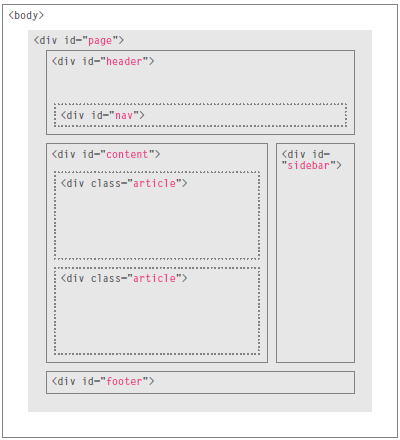
-
The < header > and < footer> elements can be used for: ●● The main header or footer that appears at the top or bottom of every page on the site. ●● A header or footer for an individual < article> or < section> within the page.
-
The < nav> element is used to contain the major navigational blocks on the site such as the primary site navigation.
-
The < nav> element is used to contain the major navigational blocks on the site such as the primary site navigation.
-
The < article > element acts as a container for any section of a page that could stand alone and potentially be syndicated.
-
The < aside> element has two purposes, depending on whether it is inside an < article> element or not. When the < aside> element is used inside an < article> element, it should contain information that is related to the article but not essential to its overall meaning.When the < aside> element is used outside of an < article> element, it acts as a container for content that is related to the entire page .
-
The < section> element groups related content together, and typically each section would have its own heading.
-
The purpose of the < hgroup> element is to group together a set of one or more < h1> through < h6> elements so that they are treated as one single heading.
-
HTML5 allows web page authors to place an < a> element around a block level element that contains child elements. This allows you to turn an entire block into a link.
CSS :
-
take ideas about your ausiance and why they will visit your website.
-
Site maps allow you to plan the structure of a site.
-
Wireframes allow you to organize the information that will need to go on each page.
-
Design is about communication. Visual hierarchy helps visitors understand what you are trying to tell them.
-
You can differentiate between pieces of information using size, color, and style.
-
You can use grouping and similarity to help simplify the information you present
Javascript:
-
A script is a series of instructions that a computer can follow to achieve a goal.
-
To approach writing a script, break down your goal into a series of tasks and then work out each step needed to complete that task (a flowchart can help).
-
The HTML < script> element is used in HTML pages to tell the browser to load the JavaScript file (rather like the < link> element can be used to load a CSS file).